Exercises and tests
Write a structure once as a function of a seed, and you have an exercise for every student, every week, each with an answer key that is always right: @edubeam/fem solves it, and @edubeam/plot draws the assignment and the key from the same model.
Press New exercise below. Each press is a new seed, generated, solved and drawn in your browser.
Three-hinged frame
H4820A frame 6 m wide and 4 m high, on pins at A and E, with a hinge at the crown C. The beam carries q = 12 kN/m over its left half, and F = 5 kN pushes B to the right. Find the support reactions and the largest bending moment.
Answer key
The demo draws the problems of two pages on this site, both built from the pieces described here: practice problems, where a student enters the reactions and the largest moment or bar force and has them checked at once, and the exam builder, which prints a different version of a test for every student with an answer key, and saves the figures as SVG files and the answers as CSV. Try them before you write your own.
How it works
- A seed picks the numbers. A seeded random generator gives the same exercise for the same seed, so the seed printed on a sheet finds its key again.
- The solver works the key. @edubeam/fem solves each structure, so the reactions and moments come from the solver, not from a formula you might get wrong.
- The plot draws both. The sheet shows the structure with its node labels, its dimensions and the unknown reactions by name; the key gives the reactions' values and adds the diagram.
A few short files take you from here to a printed test: the generator, a component for a web page, and a script that prints a test or writes figures for LaTeX and Word. Copy them into a project that has the libraries installed; the scripts run with node from version 22.18, or with npx tsx on older versions.
The generator
One module, exercise.ts, turns a seed into an exercise: a beam on a pin and a roller, half the time with an overhang carrying a point load at its tip. Both are statically determinate, so every seed can be solved by hand as well as by the solver.
import { DofID, LinearStaticSolver } from '@edubeam/fem'
import { extremes, modelFromSolver, type PlotModel } from '@edubeam/plot'

export interface Exercise {
  readonly seed: number
  readonly statement: string
  /** The solved structure as plain data: draws both the assignment and the key */
  readonly model: PlotModel
  /** Upward support reactions, N, and the extreme bending moments, N·m */
  readonly key: { RA: number; RB: number; mMax: number; mMin: number }
}

/** mulberry32: a tiny seeded generator, so a seed names the same exercise for good */
const random = (seed: number) => () => {
  seed = (seed + 0x6d2b79f5) | 0
  let t = Math.imul(seed ^ (seed >>> 15), seed | 1)
  t ^= t + Math.imul(t ^ (t >>> 7), t | 61)
  return ((t ^ (t >>> 14)) >>> 0) / 4294967296
}

export const makeExercise = (seed: number): Exercise => {
  const r = random(seed)
  const pick = <T>(xs: readonly T[]): T => xs[Math.floor(r() * xs.length)]
  const int = (lo: number, hi: number) => lo + Math.floor(r() * (hi - lo + 1))

  // A span on a pin and a roller, with an overhang half the time: determinate, so always solvable
  const L = pick([4, 5, 6]) // m
  const c = pick([0, 0, 1, 1.5, 2]) // m of overhang
  const q = int(4, 12) // kN/m on the span
  const F = int(2, 6) * 5 // kN at the tip, or at `a` from A without an overhang
  const a = int(1, L - 1) // m

  const solver = new LinearStaticSolver()
  const { domain } = solver
  domain.createMaterial(1, { e: 210e9, g: 81e9 })
  domain.createCrossSection(1, { a: 28.5e-4, iy: 1943e-8, h: 0.2, k: 1e32 })
  domain.createNode('A', [0, 0, 0], [DofID.Dx, DofID.Dz])
  domain.createNode('B', [L, 0, 0], [DofID.Dz])
  domain.createBeam2D(1, ['A', 'B'], 1, 1)
  const lc = solver.loadCases[0]
  lc.createBeamElementUniformEdgeLoad(1, [0, q * 1e3], true)
  if (c > 0) {
    domain.createNode('C', [L + c, 0, 0])
    domain.createBeam2D(2, ['B', 'C'], 1, 1)
    lc.createNodalLoad('C', { [DofID.Dz]: F * 1e3 })
  } else {
    lc.createBeamConcentratedLoad(1, [0, F * 1e3, 0, a], true)
  }
  solver.solve()

  const statement =
    c > 0
      ? `Span L = ${L} m with an overhang c = ${c} m. q = ${q} kN/m on the span, F = ${F} kN at the tip C.`
      : `Span L = ${L} m. q = ${q} kN/m over the span, F = ${F} kN at ${a} m from A.`

  // The key, from the solved model: reactions (z points down, so up is minus), exact extremes of M
  const model = modelFromSolver(solver)
  const { reactions, members } = model.results!
  const up = (node: string) => -(reactions.find((x) => x.node === node && x.dof === 'dz')?.value ?? 0)
  const m = Object.values(members).flatMap((member) => extremes(member.M) ?? [])
  const mMax = Math.max(...m.map((e) => e.max.value))
  const mMin = Math.min(...m.map((e) => e.min.value))

  return { seed, statement, model, key: { RA: up('A'), RB: up('B'), mMax, mMin } }
}
modelFromSolver reads the solved structure into a plot model: plain data with the reactions and every member's results as exact polynomials, so extremes finds the largest moments without sampling. The exercise keeps only that model; the solver is no longer needed.
Seed 5 gives "Span L = 6 m with an overhang c = 1.5 m. q = 5 kN/m on the span, F = 25 kN at the tip C." Its key: kN, kN, kNm over the support, and kNm in the span, where the shear is zero. The solver agrees to the last digit.
On a web page
A component, ExerciseCard.vue, draws the assignment, or with answers the key:
<script setup lang="ts">
import { computed } from 'vue'
import { formatQuantity, KN_UNITS, StructurePlot, type PlotLayer } from '@edubeam/plot'
import { makeExercise } from './exercise'

const props = defineProps<{ seed: number; answers?: boolean }>()
const exercise = computed(() => makeExercise(props.seed))

const sheet: PlotLayer[] = ['members', 'supports', 'loads', 'reactions', 'nodeLabels', 'dimensions']
const key: PlotLayer[] = ['members', 'supports', 'reactions', 'M']
const twoDecimals = new Intl.NumberFormat('en', { maximumFractionDigits: 2 })
const kN = (si: number) => formatQuantity(si, KN_UNITS.force, twoDecimals)
const kNm = (si: number) => formatQuantity(si, KN_UNITS.moment, twoDecimals)
</script>

<template>
  <article>
    <h3>Exercise {{ seed }}</h3>
    <p>{{ exercise.statement }} Find the reactions and draw the bending moment diagram.</p>
    <StructurePlot
      :model="exercise.model"
      :layers="answers ? key : sheet"
      :reserve="[...sheet, ...key]"
      :reaction-labels="answers ? 'values' : 'names'"
      :reserve-reaction-labels="['names', 'values']"
    />
    <p v-if="answers">
      R<sub>A</sub> = {{ kN(exercise.key.RA) }}, R<sub>B</sub> = {{ kN(exercise.key.RB) }},
      M from {{ kNm(exercise.key.mMin) }} to {{ kNm(exercise.key.mMax) }}
    </p>
  </article>
</template>
<ExerciseCard :seed="5" />
<ExerciseCard :seed="5" answers />
The second card ends with RA = 8.75 kN, RB = 46.25 kN, M from −37.5 kNm to 7.66 kNm. formatQuantity writes the unit and a true minus sign, as the plot does.
On the sheet, reaction-labels="names" draws the reactions as the unknowns: an arrow for every direction a support holds, pointing the way it counts as positive (to the right, upwards, counter-clockwise), named Ax, Az, MA instead of sized. The sign of every answer is then defined on the drawing: a reaction that acts the other way is negative. The key writes the values.
reserve lays out the layers of both views from the start, so switching answers on, with a Show the solution button for self-study, fades the diagram in where it belongs (Figures that build up). reserve-reaction-labels does the same for the reactions, so the beam stays put while their names turn into values: see Reactions as unknowns.
A printed test
For a written test, a Node script, print-test.ts, writes one page per student and the keys after them. structureSvg turns each model into SVG text, so the script needs neither Vue nor a browser:
import { writeFileSync } from 'node:fs'
import { structureSvg, type PlotLayer } from '@edubeam/plot'
import { makeExercise } from './exercise.ts'

const students = ['Ada', 'Ben', 'Cleo']
const exercises = students.map((_, i) => makeExercise(1000 + i)) // seeds 1000, 1001, …

const sheet: PlotLayer[] = ['members', 'supports', 'loads', 'reactions', 'nodeLabels', 'dimensions']
const key: PlotLayer[] = ['members', 'supports', 'reactions', 'M']
const task = 'Find the reactions and draw the bending moment diagram.'

const pages = [
  ...exercises.map((e, i) => `<h2>${students[i]}, exercise ${e.seed}</h2>
    <p>${e.statement} ${task}</p>${structureSvg(e.model, { layers: sheet, reactionLabels: 'names' })}`),
  ...exercises.map((e) => `<h2>Key, exercise ${e.seed}</h2>
    ${structureSvg(e.model, { layers: key })}`),
]

const style = `body { font: 15px/1.5 system-ui, sans-serif; max-width: 640px; margin: 2rem auto }
  section { break-after: page }`
writeFileSync('test.html', `<!doctype html><meta charset="utf-8"><title>Test</title>
  <style>${style}</style>${pages.map((page) => `<section>${page}</section>`).join('\n')}`)
node print-test.ts
Open test.html in a browser and print it, or save it as PDF: every student's exercise and every key gets a page of its own. Ada's page and its key:
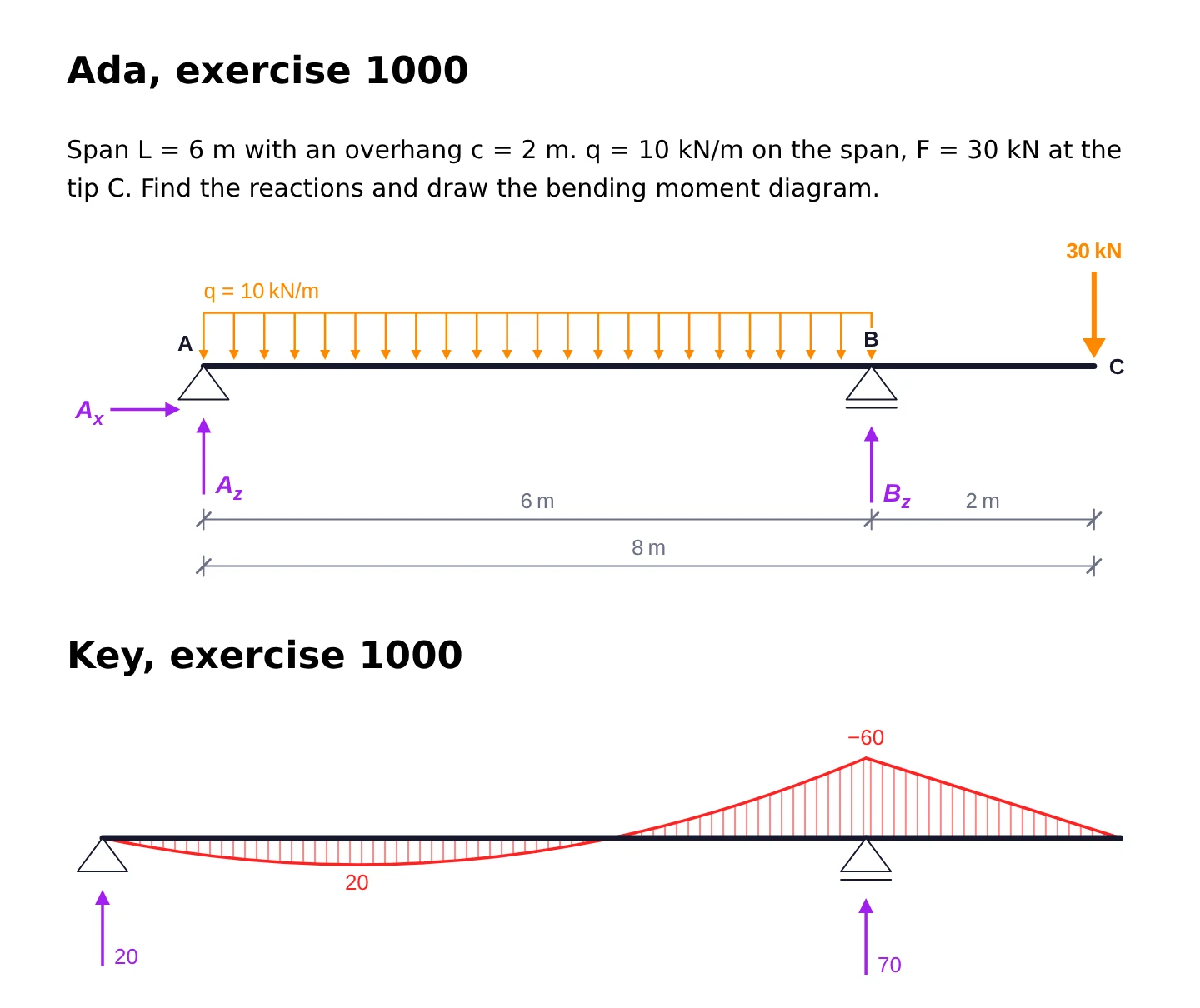
The dimensions layer gives every span and the overall length, as an exercise sheet does, and reactionLabels: 'names' names the unknowns, each arrow pointing the way its answer counts as positive. In the key, reactions and diagram values are bare numbers in kN and kNm, as in the EduBeam app: say so in the key's heading if your students need telling. For a black-and-white copier, pass colors with every tone set to black: see Black and white.
Figures for LaTeX and Word
If your tests are written in LaTeX or Word, write the figures as files instead and keep your own template. figures.ts writes the sheet and the key of 30 seeds:
import { writeFileSync } from 'node:fs'
import { structureSvg, type PlotLayer } from '@edubeam/plot'
import { makeExercise } from './exercise.ts'

const sheet: PlotLayer[] = ['members', 'supports', 'loads', 'reactions', 'nodeLabels', 'dimensions']
const key: PlotLayer[] = ['members', 'supports', 'reactions', 'M']

for (let seed = 1000; seed < 1030; seed++) {
  const { model } = makeExercise(seed)
  writeFileSync(`exercise-${seed}.svg`, structureSvg(model, { layers: sheet, reactionLabels: 'names' }))
  writeFileSync(`exercise-${seed}-key.svg`, structureSvg(model, { layers: key }))
}
Run it with node figures.ts: that is 60 files for 30 students, each a plain SVG with fixed colours, no CSS and no scripts.
- Word (2019 and Microsoft 365) inserts an SVG as it is: Insert › Pictures.
- LaTeX includes PDF rather than SVG. Convert once, with CairoSVG (
cairosvg exercise-1000.svg -o exercise-1000.pdf) or Inkscape, then\includegraphics[width=\linewidth]{exercise-1000.pdf}. Thesvgpackage's\includesvgdoes the conversion for you if Inkscape is installed.
A figure is 640 units wide with 13-unit text, so at the width of an A4 text column, about 16 cm, its labels are 9 pt. Set fontFamily to a font your document uses: see A standalone SVG file for every option.
Make it your own
- More kinds of structure. Add cases: a cantilever, a two-span continuous beam, a portal frame, a truss. The live demo at the top picks from eight kinds, from a simply supported beam to a three-hinged frame, a Warren truss and a portal frame.
- Statically indeterminate exercises. The solver handles them just as well; only the hand solution gets longer.
- Round numbers. Draw loads and lengths from short lists, as above, so the key comes out as round as you like. Loop over a few hundred seeds and skip those whose key has more decimals than you want.
- Guard against mechanisms. A generator that can place supports badly should solve inside a
tryand skip the seeds that throw: see When solving fails. - Ask for more. Draw the shear force (
'V'), the deflection ('w', with the values fromgetUnknowns), or the normal force in an inclined member.