Tutorial: continuous beam and support settlement
Model a beam continuous over two spans, compare it with two simple spans, and then let its middle support settle by 10 mm. Equilibrium alone cannot give the reactions of this beam, so you will check them with the force method.
- Time: about 25 minutes. This is the last and richest of the four tutorials.
- You need: EduBeam open in a second tab, on a computer with a mouse and keyboard. The Quick start, or one of the tutorials before this one, if you have not used EduBeam before.
- Background: the force method for one redundant, and the mid-span deflections of a simple beam, under a uniform load and under a point load.
- Units: SI. The units chip at the bottom right of the viewer should read
m m² kN kNm MPa. If it shows feet and kips, click it and set Unit system to SI (metric).
You will learn to
- see what continuity buys: smaller moments and deflections than in simple spans,
- prescribe a support settlement, and read the forces it causes on its own,
- check an indeterminate beam with the force method, and see why a stiffer beam suffers more from a settlement.
The problem
- Two spans of m: a pin at node 1, rollers at nodes 2 and 3.
- A uniform load kN/m on both spans.
- Steel, GPa, and m⁴ (an IPE 300), so kNm².
- In the second part, the middle support, node 2, settles by mm.
Is it determinate? Four reactions (two at node 1, one each at nodes 2 and 3) against three equations of equilibrium: the beam is once statically indeterminate. The missing equation comes from the deformation: node 2 does not move, or moves by exactly .
Model it
Material and section
- Click Clear mesh in the app bar, tick Delete materials and Delete cross sections, and click Confirm. Nodes and elements are numbered from 1 again.
- Materials tab → Material library → + on the Steel (S235) row, then Cancel to close the library.
- Cross sections tab → Add cross section. Type
8.356e-5in Iy, keep Area, Height and Shear coefficient at1, and click Add cross section.
An area of 1 m² keeps the beam from shearing noticeably, as the hand calculation assumes. This time matters for the forces too: you will see where.
Draw the beam
- Elements tab → the second Add element button, the one with the cursor icon.
- Click at (0, 0), (6, 0) and (12, 0).
- Press Esc to stop drawing, then F to fit the view.
Three nodes and two elements. Check the coordinates in the Nodes table.
Supports
Click node 1 → Node supports → the Pin symbol. Give nodes 2 and 3 the Roller.
Load
Loads tab → Add element load → Uniformly distributed load on Element 1, fz = 10 → Add element load. Repeat for element 2.
Results
The bending moment, reactions and deformed shape are on from the start. Tick Vz (x) in the display options at the top right of the viewer (the cog shows and hides them) for the shear force. EduBeam labels the diagrams and reactions in kN and kNm with two decimals.
- The reactions read
22.50at nodes 1 and 3, and75.00at node 2: the middle support carries more than half of the 120 kN. - The moment over node 2 reads
-45.00, hogging. The spans sag by at most25.31kNm, 2.25 m from the end supports. - The shear force jumps from
-37.50to37.50over node 2.
Compare with two simple spans
What does continuity buy? Cut it: in the Elements table, tick the end hinge of element 1, at node 2. The beam becomes two simply supported spans of 6 m, a statically determinate structure.
| Continuous | Two simple spans | |
|---|---|---|
| Reactions at nodes 1, 2, 3 | 22.5, 75, 22.5 kN | 30, 60, 30 kN |
| Moment over node 2 | −45 kNm | 0 |
| Largest sagging moment | 25.31 kNm | 45 kNm |
| Largest deflection, in the view of the figures | 4.000 mm | 9.617 mm |
The largest moment is the same 45 kNm, but in the continuous beam it moves over the support, and the spans sag far less. Each span is also 2.4 times stiffer: its end over node 2 cannot rotate, almost as if it were clamped. Untick the hinge again before you go on.
Settle the middle support
Now let node 2 sink by 10 mm, as a footing on soft ground might.
Prescribe the settlement
Click node 2 → Prescribe displacement. In the dialog, Prescribed displacement is already chosen; type 0.01 in Dz and click Add nodal load.
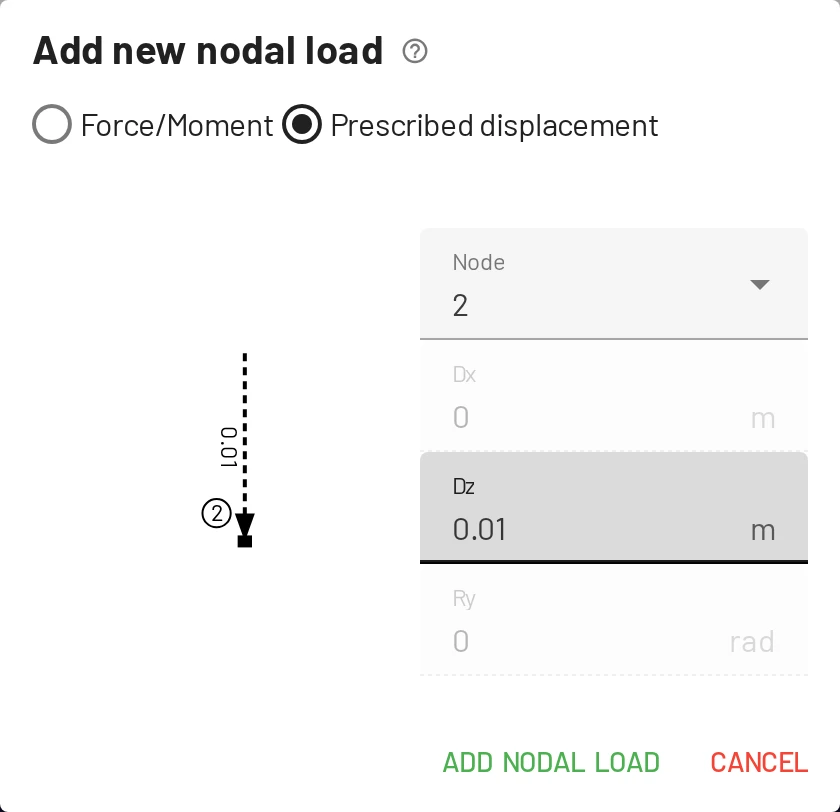
Displacements are in metres in the default SI units, so 10 mm is 0.01; positive is down. Only the restrained directions can be set: a roller can be moved down, but not sideways. More in Prescribed displacements.
Read the new results
The middle reaction drops to 70.13 kN and the end reactions rise to 24.94 kN. The moment over node 2 falls to -30.38 kNm, and the spans sag more, up to 31.09 kNm.
Look at the settlement alone
Delete the two element loads: select each and press Delete, or use the × in its row of the Loads table. What is left is the effect of the settlement on its own: a triangular moment of 14.62 kNm over node 2, sagging, and reactions that pull node 2 down by 4.87 kN while nodes 1 and 3 push up by 2.44 kN each. The beam resists being bent into the settled shape, and that resistance is all that loads it.
Add this to the results under the load alone and you get the settled beam under load: 75 − 4.87 = 70.13 kN, −45 + 14.62 = −30.38 kNm. The analysis is linear, so effects superpose.
Cut the continuity again
Bring the loads back with Ctrl+Z, once per deleted load, and tick the end hinge of element 1 again. The settled spans now just tilt: the reactions and moments are exactly those of two simple spans, whatever the settlement, and without the loads they would be zero. A settlement causes internal forces only in a statically indeterminate structure. Untick the hinge before you go on.
Check by hand
Use the force method. Remove the support at node 2 and replace it by its unknown reaction , acting upward on a simply supported beam of span m.
Deflections of the released beam at node 2. Under the load, and under a unit upward force at node 2:
Compatibility. has to push node 2 back up until it sits where the support is: at zero, or below.
Everything else follows from equilibrium; the largest sagging moment sits where the shear is zero.
| Formula | No settlement | Node 2 settled 10 mm | |
|---|---|---|---|
| 75.00 kN | 70.13 kN | ||
| 22.50 kN | 24.94 kN | ||
| −45.00 kNm | −30.38 kNm | ||
| 25.31 kNm | 31.09 kNm |
EduBeam shows the same values to the last digit.
Without settlement these are the textbook values , and . The settlement alone changes the reactions by kN and the moment over node 2 by
Note the in it. The forces caused by a load depend only on how stiff the members are relative to each other; the forces caused by an imposed displacement grow with the stiffness itself. Over a settling support, a stiffer beam attracts larger moments.
Experiment
Start from the settled beam under load, change one thing at a time, predict the result, then look. Ctrl+Z takes each change back.
Double the stiffness. In the Cross sections table, set Iy to 1.6712e-4. The effect of the settlement on the moment over node 2 doubles to 29.25 kNm, and drops to −15.75 kNm. Under the load alone nothing would change but the deflections, which would halve.
Find the settlement that frees node 2. For which is the moment over node 2 zero? kNm needs m. Change the settlement to 0.0308, in the Loads table or by double-clicking it in the viewer: the reactions become 30, 60 and 30 kN, those of two simple spans, give or take the rounding of . is the end rotation of a simple span times : the settlement tilts each span by just enough to close the kink over node 2, so continuity no longer has anything to do.
Let node 2 go. Change the settlement to 0.1539, the deflection of the released 12 m beam. The reaction at node 2 drops to practically zero, and the beam carries the load as one simple span: 180 kNm at mid-span. A support that settles that much is no longer a support.
Lift node 2 instead. Change the settlement to -0.01, 10 mm up. Every change from the settlement flips sign: node 2 now takes 79.87 kN and the hogging moment grows to −59.62 kNm.
More closed-form checks, including a settlement of a propped cantilever, are in Checking results by hand.
Next steps
Practise: continuous beams
Two-span beams loaded on one span or both, solved with the force method, with your answers checked at once. Start with K2049; for more, select only Two-span continuous beam and press New problem.
Examples gallery
That was the last tutorial. The examples gallery has more models to open, change and check, and exercises to set.