Troubleshooting
No results are drawn
Results appear only when the model can be solved. Check, in this order:
- Read the message at the top left of the viewer.
- No materials defined / No cross sections defined: add one with the Add new button.
- A blue Needs supports chip: the model is simply unfinished. Add supports. Point at the chip to see, as a dashed outline, how the structure can still move.
- A red message: something is wrong. It names the problem, or reads Errors in the model: N when there are several. Click Show details and fix each item (see the table below). The nodes or hinges involved are circled on the canvas.
- A yellow message: warnings. The model was solved anyway; you can hide them.
- Enough supports? The solver needs at least three restrained DOFs, and the supports must hold the structure. A beam on two rollers (Dz + Dz) has only two and slides away. Add a
Dxsomewhere, or anRyat one support. - Are the elements connected? Two nodes at the same coordinates are still two separate nodes. Delete the stray one and reconnect, or place nodes on elements with Connect to structure.
- Too many hinges? Hinges at both ends of a column, or a square of pin-jointed bars without a diagonal, make a mechanism. EduBeam circles the hinges and shows the motion.
- A stiffness of zero?
E,AorIyaccidentally entered as 0, or in the wrong unit, makes part of the structure move almost without resistance. EduBeam reports that as unstable.
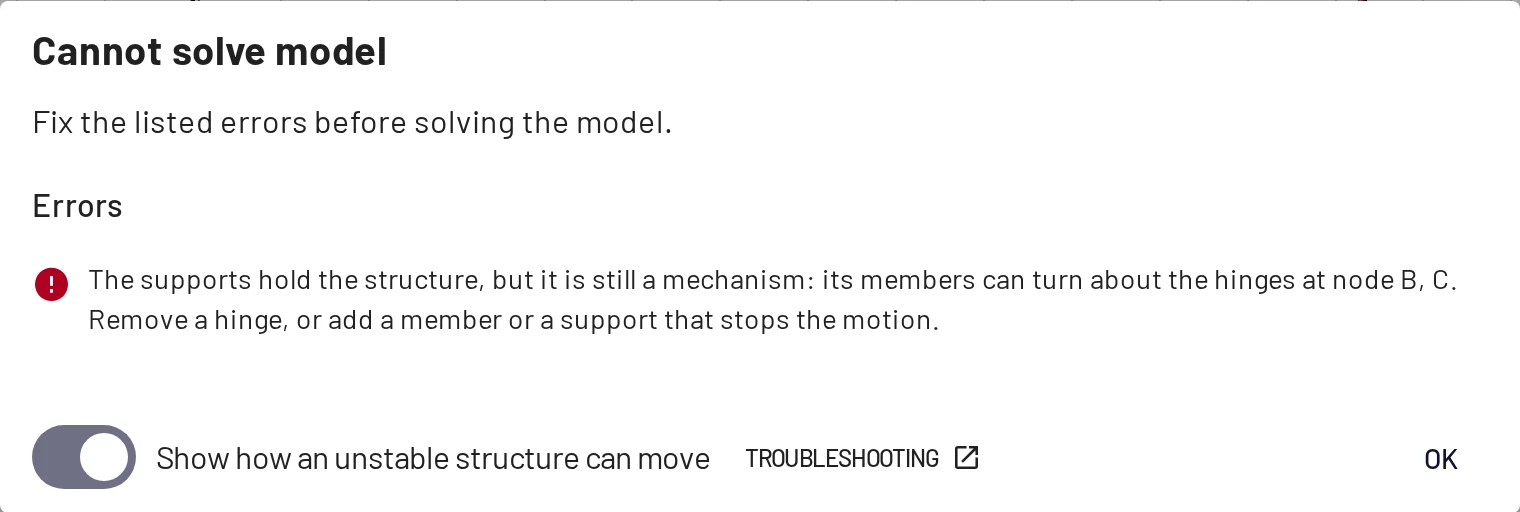
Messages
Show details opens a dialog titled Cannot solve model (errors), Not ready to solve yet (supports still needed) or Model warnings. Its Troubleshooting link leads here.
Still needed
| Message | Meaning / fix |
|---|---|
| The structure needs supports before it can be solved. | Fewer than three restrained DOFs in total. Add supports. |
| A separate part of the structure (nodes …) has fewer than 3 restrained DOFs and can move freely. | The model is in pieces and one piece floats. Connect it, or support it. |
Errors
| Message | Meaning / fix |
|---|---|
| Structure has enough supports but they do not hold it: it can still … | The supports are all parallel, or their lines of action meet in one point. The dashed outline shows the motion; change the direction of one support. The same message names a separate part if only one piece is affected. |
| The supports hold the structure, but it is still a mechanism: its members can turn about the hinges at node … | The hinges let members turn against each other, as in a frame with hinges at the top of both columns or a pin-jointed square without a diagonal. Remove a hinge, or add a member or a support. |
| Structure is unstable: node … moves practically without resistance. | Nearly a mechanism, or a stiffness close to zero. Check supports, hinges, and the values of E, A and Iy. |
| Structure is a mechanism: the stiffness matrix is singular. | Something can move freely that the checks above did not catch. Check that every part is held by at least three restraints and that hinges do not leave a member free to rotate. |
| Element … references missing node / material / cross section … | The referenced object was deleted, usually in a hand-edited JSON file. Reassign it in the Elements table. |
| Element … must reference exactly 2 nodes. | A broken element in an imported file. Delete and recreate it. |
| Nodal load / Prescribed displacement #n references missing node … | Delete the load or give it a node. |
| Element load #n references missing element … | Delete the load. |
| Solver failed due to an internal model inconsistency… | A generic failure. Undo the last step, or save the file and report it. |
Warnings
The model is solved anyway, but check these:
| Message | Meaning / fix |
|---|---|
| Node … is not connected to any element and is ignored by the solver. | A stray node. Delete it, or connect it. |
| Node … is supported but no element connects to it, so the support carries nothing. | A support on a stray node. |
| Element … references the same node at both ends. | A zero-length element. Delete it. |
| Nodal load / Prescribed displacement #n contains invalid values. | A component that is not a number. Edit the load. |
Results look wrong
| Symptom | Likely cause |
|---|---|
| Loads act upward | Global z points down, so positive Fz/fz is downward. Negative values point up. See conventions. With y-up axes it is the other way round. |
| Deflection is 1000× too big or too small | A unit mix-up: E entered in Pa while the unit is MPa, or Iy in cm⁴ while the unit is m⁴. Check the units chip at the bottom right of the viewer. |
| Deflection slightly larger than the textbook formula | Timoshenko shear deformation. Increase the section's shear coefficient, or use a slender member, to approach Euler–Bernoulli values. See Checking results by hand. |
| A sign looks "wrong" | Read the sign from the labels, not the side of the diagram. Positive M is sagging. End forces in Element results follow the element's local axes, not the N-V-M convention. |
| Two identical columns show opposite shear signs | The sign of V follows each element's direction. Swap the nodes of one to compare. |
Numbers like 4 · 10¹ | The scientific number format. Choose Automatic in Settings → Language & Locale → Number format. |
| Diagrams are huge or tiny | Purely visual. Adjust Results scale in Settings → Viewer settings. |
| A local-coordinate load points the wrong way | The element's local x runs from its initial to its end node. Swap the nodes, or flip the sign. |
| An inclined member's load is off | LCS is ticked by default, so fz acts perpendicular to the member. Untick it for a vertical load. |
| A temperature load does nothing | A determinate structure deforms freely under temperature, without internal forces. Check that α ≠ 0 and, for the gradient, that the section height h is set. |
Interface issues
| Symptom | Fix |
|---|---|
| Shortcuts do nothing | Click the canvas first: keys are ignored while a text field has focus. |
| Cannot pan | Panning uses the middle or right mouse button by default; change it in Settings → Controls & Shortcuts. On a trackpad, two-finger scrolling zooms; click and drag with two fingers to pan. |
| My model disappeared | Opening a link, a file or an example, and clearing, keep the old model: ☰ → Recent structures, or Ctrl+Z. |
| Wrong language | Settings → Language & Locale, or add ?lang=en to the address. |
| Settings changes do not stick | Local storage is blocked (private window, strict privacy mode). Settings, autosave and Recent structures need it. |
Reporting a bug
Open a GitHub issue with your browser and OS, what you expected, and, most useful of all, a share link or the project file that reproduces the problem.